Logorrhea – Excessive Talkativeness
Symptoms: Customer is unable to break-in to ask a question; presenter feels obligated to keep on talking if he/she hears nothing from customer. Condition is often exacerbated when working over certain conference room speaker phone systems. Audience often lapses into disgruntled silence for the balance of the demo. Demo fails; sales person does not get order; customer goes with the competition.
Examples: “But, what if…”
“Um, excuse me but…”
“Can I ask…?”
“Never mind.”
Cure: Remove Starbucks coffee cups from victim’s immediate area. Have victim slow down delivery and put pauses in place. Encourage victim to summarize at the end of each section. Ask questions more often and give audience time to respond. Check telephone connection and speakerphone for bisynchronicity before launching into demo.
Monday, October 20, 2008


Thursday, October 16, 2008
Debilitating Demo Diseases - Staff Infection
Infection – Group Blindness
Symptoms: Doing the same demo(s) over and over, regardless of customer needs or desires.
Examples: “We’ve always done it this way…”
“New hire, are you? Great – here’s the script for our demo. Memorize it by next Monday…”
Cure: Rapid, deep application of Great Demo! methodology. Reframe and customize demos for each key audience members’ situation. Turn traditional demos upside down and start with the pay-off, the “Wow!” factor:
1. Review customer’s Situation
2. Present the Illustration of the end result
3. Do It – show how to get there in the fewest number of steps
4. Peel Back the Layers in accord with customer interest
5. Manage Questions along the way
6. Summarize so customer retains the key points
Symptoms: Doing the same demo(s) over and over, regardless of customer needs or desires.
Examples: “We’ve always done it this way…”
“New hire, are you? Great – here’s the script for our demo. Memorize it by next Monday…”
Cure: Rapid, deep application of Great Demo! methodology. Reframe and customize demos for each key audience members’ situation. Turn traditional demos upside down and start with the pay-off, the “Wow!” factor:
1. Review customer’s Situation
2. Present the Illustration of the end result
3. Do It – show how to get there in the fewest number of steps
4. Peel Back the Layers in accord with customer interest
5. Manage Questions along the way
6. Summarize so customer retains the key points
Monday, October 13, 2008
Debilitating Demo Diseases - Harbor Tour Delusion
Harbor Tour Delusion – Living in the Land of Hope
Symptoms: Presenting a long, tortured demo that attempts to cover all of the possible customer needs and problems before any reasonable discussion of the customer’s situation.
Aka: Harbor Tour Demo, Show-up-and-Throw-up, Spray and Pray, the Spaghetti Demo, Doin’ the Demo Dash.
Examples: “To give you an idea of what we do, let me show you a demo…”
“Stop me if anything looks interesting…”
[Trade show booth] “Hi – would you like a demo?”
Cure: Collect a handful of Informal Success Stories. Distill and carefully extract the key Situation information, based on:
· Job Title and Industry
· Critical Business Issue
· Reason
· Specific Capabilities
· Delta
Match customer Job Title/Industry, present appropriate Success Stories to generate interest, follow with questions… Apply the Menu Approach for crusty customers or larger groups. Hold back from delivering demo until customer situation is well understood.
Symptoms: Presenting a long, tortured demo that attempts to cover all of the possible customer needs and problems before any reasonable discussion of the customer’s situation.
Aka: Harbor Tour Demo, Show-up-and-Throw-up, Spray and Pray, the Spaghetti Demo, Doin’ the Demo Dash.
Examples: “To give you an idea of what we do, let me show you a demo…”
“Stop me if anything looks interesting…”
[Trade show booth] “Hi – would you like a demo?”
Cure: Collect a handful of Informal Success Stories. Distill and carefully extract the key Situation information, based on:
· Job Title and Industry
· Critical Business Issue
· Reason
· Specific Capabilities
· Delta
Match customer Job Title/Industry, present appropriate Success Stories to generate interest, follow with questions… Apply the Menu Approach for crusty customers or larger groups. Hold back from delivering demo until customer situation is well understood.
Wednesday, October 8, 2008
Debilitating Demo Diseases - Atrophied Communication
Atrophied Communication (aka CRM Refusal) – Pre-Call Inadequacy
Symptoms: Sales rep communicates key pre-call information in the car on the way to the customer, in the customer’s parking lot, or in the customer’s lobby.
Examples: Sales rep: “Oh, by the way, you need to show them the new biframulator tool – I promised them that we’d show it today.”
Presales Person: “Oh – that’s too bad; I don’t have it on my machine. Why didn’t you ever answer my email messages asking what we know about the account and what we need to show?!!”
Cure: Take two cell phones (or Blackberries) daily. Use to communicate pre-call information as needed – well before the demo is scheduled.
Symptoms: Sales rep communicates key pre-call information in the car on the way to the customer, in the customer’s parking lot, or in the customer’s lobby.
Examples: Sales rep: “Oh, by the way, you need to show them the new biframulator tool – I promised them that we’d show it today.”
Presales Person: “Oh – that’s too bad; I don’t have it on my machine. Why didn’t you ever answer my email messages asking what we know about the account and what we need to show?!!”
Cure: Take two cell phones (or Blackberries) daily. Use to communicate pre-call information as needed – well before the demo is scheduled.
Monday, October 6, 2008
Debilitating Demo Diseases - Rampaging Pronouns
Rampaging Pronouns – Too Many Fictional Characters
Symptoms: Demo begins by introducing Mike the Manager, Eunice the End-User, Veronica the VP, Andrew in Accounting, Sally the Sales Director, and Ike from IT. Presenter immediately loses track of which pronoun to use: I, you, he, she, them, they, um, hmmm. Audience immediately loses patience. Sales rep loses deal, misses quota, and suffers Terminus Abruptus.
Examples: “Next, I’ll show you how Eunice enters the account information, which you can use to calculate the total so she can add the new lines which I need for the next section.”
Cure: Apply restraints; purge excess pronouns (may be painful – Pro-No™ and Pronoun-Be-Gone® are two products often recommended and can be purchased over-the-counter). Replace with “you”, exclusively.
Symptoms: Demo begins by introducing Mike the Manager, Eunice the End-User, Veronica the VP, Andrew in Accounting, Sally the Sales Director, and Ike from IT. Presenter immediately loses track of which pronoun to use: I, you, he, she, them, they, um, hmmm. Audience immediately loses patience. Sales rep loses deal, misses quota, and suffers Terminus Abruptus.
Examples: “Next, I’ll show you how Eunice enters the account information, which you can use to calculate the total so she can add the new lines which I need for the next section.”
Cure: Apply restraints; purge excess pronouns (may be painful – Pro-No™ and Pronoun-Be-Gone® are two products often recommended and can be purchased over-the-counter). Replace with “you”, exclusively.
Thursday, October 2, 2008
Debilitating Demo Diseases - Auto-Demo Hell
Auto-Demo Hell – Cluelessness in Recorded Demos
Symptoms: See Vacuuosititis, below. Additionally, victim assumes that all prospects have the same problem, the same challenges, and the same objectives. Victim attempts to create a “one-size-fits-all” demo in spite of serving multiple markets and job titles. Viewers habitually drop-out of the 20 minute recording after only 2 minutes. Victim delusion and hallucinations may occur, signified by calling this a “highly qualified, hot lead”.
Examples: “Click here to watch our product demo.”
Cure: Create a cocktail of Informal Success Stories; then distill carefully to recover the High-Probability Sales Situations. Craft focused, specific demos for each targeted Sales Situation and provide a Menu to prospects browsing to guide them to the relevant Sales Situation by Job Title and/or Industry. Note: symptoms may reappear with each new software release.
Symptoms: See Vacuuosititis, below. Additionally, victim assumes that all prospects have the same problem, the same challenges, and the same objectives. Victim attempts to create a “one-size-fits-all” demo in spite of serving multiple markets and job titles. Viewers habitually drop-out of the 20 minute recording after only 2 minutes. Victim delusion and hallucinations may occur, signified by calling this a “highly qualified, hot lead”.
Examples: “Click here to watch our product demo.”
Cure: Create a cocktail of Informal Success Stories; then distill carefully to recover the High-Probability Sales Situations. Craft focused, specific demos for each targeted Sales Situation and provide a Menu to prospects browsing to guide them to the relevant Sales Situation by Job Title and/or Industry. Note: symptoms may reappear with each new software release.
Wednesday, October 1, 2008
Debilitating Demo Diseases - Vacuuosititis
Vacuuosititis – Cluelessness in Marketing Roll-out Demos (aka Feature Rash)
Symptoms: A rash of features and non-specific, buzzword-compliant benefit statements. Atrophied, disconnected, narcoleptic audience reaction. Snoring.
Examples: “Now I’ll show you our new biframulator tool, designed to save time and money.
“Next I’ll present all of the new capabilities we’ve put into the new release – shouldn’t take more than two hours…”
Cure: Apply Get-A-Clue™ topically. Gather Informal Success Stories from existing customers, pre-release and beta sites, and apply liberally to the affected presentation. Replace feature-orientation with Critical Business Issue/Solution scenarios. Repeat as necessary until feature rash disappears.
Symptoms: A rash of features and non-specific, buzzword-compliant benefit statements. Atrophied, disconnected, narcoleptic audience reaction. Snoring.
Examples: “Now I’ll show you our new biframulator tool, designed to save time and money.
“Next I’ll present all of the new capabilities we’ve put into the new release – shouldn’t take more than two hours…”
Cure: Apply Get-A-Clue™ topically. Gather Informal Success Stories from existing customers, pre-release and beta sites, and apply liberally to the affected presentation. Replace feature-orientation with Critical Business Issue/Solution scenarios. Repeat as necessary until feature rash disappears.
Monday, September 29, 2008
Debilitating Demo Diseases - Overscriptosis
Overscriptosis – Hardening of the Demo
Symptoms: Following a rigid vendor-created demo script, regardless of the needs or interest of the customer. Difficulty in determining if the demo is live or recorded, even with the presenter’s mouth moving in the front of the room.
Examples: “Let me check my script for the next thing I need to show you…”
“Hang on a moment, I need to find my place in the script…”
Cure: Inject Reality, intravenously. Invest in sufficient qualification and discovery with the customer to determine what Specific Capabilities are desired. Show these, only, following the Great Demo! methodology:
1. Review the customer’s Situation
2. Present an Illustration of the end result
3. Do It (prove it in the fewest number of steps)
4. Peel Back the Layers in accord with the customer’s interest
5. Manage questions
6. Summarize
Symptoms: Following a rigid vendor-created demo script, regardless of the needs or interest of the customer. Difficulty in determining if the demo is live or recorded, even with the presenter’s mouth moving in the front of the room.
Examples: “Let me check my script for the next thing I need to show you…”
“Hang on a moment, I need to find my place in the script…”
Cure: Inject Reality, intravenously. Invest in sufficient qualification and discovery with the customer to determine what Specific Capabilities are desired. Show these, only, following the Great Demo! methodology:
1. Review the customer’s Situation
2. Present an Illustration of the end result
3. Do It (prove it in the fewest number of steps)
4. Peel Back the Layers in accord with the customer’s interest
5. Manage questions
6. Summarize
Thursday, September 25, 2008
Debilitating Demo Diseases - Clairvoyance Annoyance
Clairvoyance Annoyance (aka Premature Elaboration)
Symptoms: Prescience. Answering questions before they are completed because you’ve heard them all hundreds of times before. Causes severe annoyance in customers. The appearance of great embarrassment, flushing and jackass ears on the presenter may also occur.
Examples: Customer: “Does it run on…”
Presenter: “Yes! We support Vista, Windows XP and some older versions of Windows, including the MS Office products on each of those platforms, including Office 97, Office 2003, Office 2007 and all of the current and ‘compatibility’ file types.”
Customer: “…Macintosh?”
Presenter: “Oh. No.”
Cure: Zip it – and let the customer ask the full question. Listen intently. Ask for clarification, as needed. Parse as to whether the question is a Great Question (answer it right away), a Good Question (queue it up for later) or a Stupid Question (also queue it up for later). Manage Q&A professionally using a “Not Now List” or “Parking Lot”.
Symptoms: Prescience. Answering questions before they are completed because you’ve heard them all hundreds of times before. Causes severe annoyance in customers. The appearance of great embarrassment, flushing and jackass ears on the presenter may also occur.
Examples: Customer: “Does it run on…”
Presenter: “Yes! We support Vista, Windows XP and some older versions of Windows, including the MS Office products on each of those platforms, including Office 97, Office 2003, Office 2007 and all of the current and ‘compatibility’ file types.”
Customer: “…Macintosh?”
Presenter: “Oh. No.”
Cure: Zip it – and let the customer ask the full question. Listen intently. Ask for clarification, as needed. Parse as to whether the question is a Great Question (answer it right away), a Good Question (queue it up for later) or a Stupid Question (also queue it up for later). Manage Q&A professionally using a “Not Now List” or “Parking Lot”.
Tuesday, September 23, 2008
Debilitating Demo Diseases - Crickets
Crickets
Symptoms: The sound in the room after the presenter asks, “So, are there any questions so far?”
Examples: Chirp-chirp-chirp-chirp-chirp-chirp-chirp-chirp-chirp-chirp-chirp-chirp-chirp….
Cure: Encourage, drive and generate interactivity. Turn the demo from a one-way presentation into a two-way conversation. Involve the customer. Ask “closed-probe” questions. Confirm interest. Invite the customer to “drive”. Pause occasionally and summarize at the end of each section. Fumigate as needed.
Symptoms: The sound in the room after the presenter asks, “So, are there any questions so far?”
Examples: Chirp-chirp-chirp-chirp-chirp-chirp-chirp-chirp-chirp-chirp-chirp-chirp-chirp….
Cure: Encourage, drive and generate interactivity. Turn the demo from a one-way presentation into a two-way conversation. Involve the customer. Ask “closed-probe” questions. Confirm interest. Invite the customer to “drive”. Pause occasionally and summarize at the end of each section. Fumigate as needed.
Monday, September 22, 2008
Debilitating Demo Diseases - Feature Pox
Feature Pox
Symptoms: Presentation of waaaaaaaay too many features and capabilities. Severe boredom, ennui, and sleeping may ensue in the customer’s ranks. Other symptoms include stifled yawns, furtive glances at wristwatches and – in one documented case – a customer getting up from the table to physically bang his head on the wall…!
Examples: “Let me go through each of the tabs across the top in order…”
“And next I’ll show you our context-sensitive help system…”
“Here are the 17 file export options – I’ll go through them one by one…”
Cure: Reality Pills, taken 4 times daily. Present only the Specific Capabilities needed by the customer to address the problem. Hold everything else back.
Symptoms: Presentation of waaaaaaaay too many features and capabilities. Severe boredom, ennui, and sleeping may ensue in the customer’s ranks. Other symptoms include stifled yawns, furtive glances at wristwatches and – in one documented case – a customer getting up from the table to physically bang his head on the wall…!
Examples: “Let me go through each of the tabs across the top in order…”
“And next I’ll show you our context-sensitive help system…”
“Here are the 17 file export options – I’ll go through them one by one…”
Cure: Reality Pills, taken 4 times daily. Present only the Specific Capabilities needed by the customer to address the problem. Hold everything else back.
Friday, September 19, 2008
Debilitating Demo Diseases - Blackberry Consumption
Blackberry Consumption
Symptoms: Sales rep sitting in the back of the room completely focused on his/her Blackberry; severely swollen thumbs; impaired ability to communicate in complete, grammatically-correct sentences.
Examples: Tap-tap-tap-tap-tap-tap-tap-tap-tap-tap-tap-tap-tap-tap-tap-tap-tap-tap-tap-tap-tap-tap-tap-tap-tap-tap-tap-tap-tap-tap-tap-tap-tap-tap-tap…– huh?
Cure: Actively engage in the demo presentation; choreograph the team members’ roles before the demo begins. For example, the sales rep’s role is to:
1. Perform the introductions and review the meeting objectives.
2. Present and review relevant Situation Slides and accompanying Illustrations.
3. Help to manage and capture “Good” (and “Stupid”) questions on a whiteboard, flipchart, or Word document.
4. Redirect audience attention away from the scene of the disaster after a software crash or severe bug.
5. Summarize when appropriate and/or inject pauses in the delivery.
6. Identify next steps and summarize the overall meeting.
Thursday, September 18, 2008
Debilitating Demo Diseases - Demo Asphyxiation
Breathlessness – Demo Asphyxiation
Symptoms: No pauses or breaks in the delivery, followed by shortness of breath, flushed face and finally passing out. (Fainting is often an outcome of Rambleitis when compounded by Whooping If and Conjunctionitis.)
Examples: “And another really cool thing about our software is the ability to ____, or ____, and if you want to ____ then you can click here, or if you have to ____ then choose this, and the next thing I want to show you is our new import wizard, which has seven different options, the first of which is ____, which is really great if you need to ____, or ____ or ____, and if you need to… need to…to… uhhhhhhhhh…” *Thunk*!
Cure: Breathe, fer cryin’ out loud! Put some pauses in the delivery; put some theatre and passion in the delivery. Put some dynamics into the delivery (louds and softs). Reciting a Shakespeare play without pauses and dynamics makes for a very boring experience:
But-soft-what-light-through-yonder-window-breaks-it-is-the-east-and-Juliet-is-the-sun-arise-fair-sun-and-kill-the-envious-moon-who-is-already-sick-and-pale-with-grief-that-thou-her-maid-art-far-more-fair-than-she… *THUNK*!
The lines from the play, Romeo and Juliet, are of course to be uttered with deep and fervent passion:
But soft, what light through yonder window breaks?
It is the east, and Juliet is the sun.
Arise, fair sun, and kill the envious moon,
Who is already sick and pale with grief
That thou, her maid, art far more fair than she.
Symptoms: No pauses or breaks in the delivery, followed by shortness of breath, flushed face and finally passing out. (Fainting is often an outcome of Rambleitis when compounded by Whooping If and Conjunctionitis.)
Examples: “And another really cool thing about our software is the ability to ____, or ____, and if you want to ____ then you can click here, or if you have to ____ then choose this, and the next thing I want to show you is our new import wizard, which has seven different options, the first of which is ____, which is really great if you need to ____, or ____ or ____, and if you need to… need to…to… uhhhhhhhhh…” *Thunk*!
Cure: Breathe, fer cryin’ out loud! Put some pauses in the delivery; put some theatre and passion in the delivery. Put some dynamics into the delivery (louds and softs). Reciting a Shakespeare play without pauses and dynamics makes for a very boring experience:
But-soft-what-light-through-yonder-window-breaks-it-is-the-east-and-Juliet-is-the-sun-arise-fair-sun-and-kill-the-envious-moon-who-is-already-sick-and-pale-with-grief-that-thou-her-maid-art-far-more-fair-than-she… *THUNK*!
The lines from the play, Romeo and Juliet, are of course to be uttered with deep and fervent passion:
But soft, what light through yonder window breaks?
It is the east, and Juliet is the sun.
Arise, fair sun, and kill the envious moon,
Who is already sick and pale with grief
That thou, her maid, art far more fair than she.
Debilitating Demo Diseases - Death by Corporate Overview
Death by Corporate Overview
Symptoms: Palpitation of the audience; sleeping audience and, eventually, severe audience loss. Audience members doodle aimlessly, glance at watches repeatedly, furtively use Blackberries, and bang heads on walls.
Examples: “Oh my God, no more slides…” “No, I’m not interested in their founding fathers, their revenues-to-date, the geographic locations of their offices, and I’m really not interested in their mission statement.” “Please let this be over…!”
Cure: Perform an immediate Radical Overviewectomy. Replace with two or three crisp, focused sentences, e.g., “Good afternoon. We’re ABC software, we’ve been in business 12 years, providing forecasting solutions to customers in manufacturing, high tech and other industries for over 2000 customers in 18 countries around the world. Now, let’s talk about your situation.”
In extreme cases where there is clear and extensive Marketing Metastasis, a deep cut may need to be made into MarCom to help address the root cause.
Symptoms: Palpitation of the audience; sleeping audience and, eventually, severe audience loss. Audience members doodle aimlessly, glance at watches repeatedly, furtively use Blackberries, and bang heads on walls.
Examples: “Oh my God, no more slides…” “No, I’m not interested in their founding fathers, their revenues-to-date, the geographic locations of their offices, and I’m really not interested in their mission statement.” “Please let this be over…!”
Cure: Perform an immediate Radical Overviewectomy. Replace with two or three crisp, focused sentences, e.g., “Good afternoon. We’re ABC software, we’ve been in business 12 years, providing forecasting solutions to customers in manufacturing, high tech and other industries for over 2000 customers in 18 countries around the world. Now, let’s talk about your situation.”
In extreme cases where there is clear and extensive Marketing Metastasis, a deep cut may need to be made into MarCom to help address the root cause.
Monday, September 15, 2008
Debilitating Demo Diseases - Whooping “If”
Whooping “If”
Symptoms: Presenter offers an ever-growing range of options, generally linked together by “if…” If’s often multiply rapidly, causing great boredom in the audience and the risk of encountering unexpected bugs and precipitating detailed, pointless questions (aka “Stupid Questions”) on topics of little interest and lower value.
Examples: “So, if you want to open an existing one, you click here and…”; “Then, if you want to create a new one, then you choose ‘New’ and…”; “Next, if …”
Cure: Inhale deeply. Exhale slowly. Apply a Biased Question when the urge to “if” presents. If you are the presenter ask yourself, “Is this really something the audience is interested in or needs to know? Is this a sales demo or product training?”
Symptoms: Presenter offers an ever-growing range of options, generally linked together by “if…” If’s often multiply rapidly, causing great boredom in the audience and the risk of encountering unexpected bugs and precipitating detailed, pointless questions (aka “Stupid Questions”) on topics of little interest and lower value.
Examples: “So, if you want to open an existing one, you click here and…”; “Then, if you want to create a new one, then you choose ‘New’ and…”; “Next, if …”
Cure: Inhale deeply. Exhale slowly. Apply a Biased Question when the urge to “if” presents. If you are the presenter ask yourself, “Is this really something the audience is interested in or needs to know? Is this a sales demo or product training?”
Sunday, September 14, 2008
Debilitating Demo Diseases - Rambleitis
Rambleitis - Run-on Demo (aka Demo Diarrhea)
Symptoms: No pauses, no breaks, no interaction with audience – often compounded by Conjunctionitis, fits of Whooping If and Zippy Mouse Syndrome.
Examples: “…and the really cool thing about this is…”
“…and the next thing I want to show you is…”
Cure: Inject pauses at least once per segment, at the end, and repeat as frequently as needed. Treat commensurate Conjunctionitis with the use of Biased Questions, designed to give the audience the opportunity to interact (e.g., “Many of our other customers have found that the ability to ____ saved them hours every week. Is this something that might also be of interest to you?”) Turn the demo from a unidirectional, fire-hose-delivery presentation into a bidirectional conversation.
An older cure, still applicable in extreme cases, is to place the patient in an ice bath until unable to speak…
Symptoms: No pauses, no breaks, no interaction with audience – often compounded by Conjunctionitis, fits of Whooping If and Zippy Mouse Syndrome.
Examples: “…and the really cool thing about this is…”
“…and the next thing I want to show you is…”
Cure: Inject pauses at least once per segment, at the end, and repeat as frequently as needed. Treat commensurate Conjunctionitis with the use of Biased Questions, designed to give the audience the opportunity to interact (e.g., “Many of our other customers have found that the ability to ____ saved them hours every week. Is this something that might also be of interest to you?”) Turn the demo from a unidirectional, fire-hose-delivery presentation into a bidirectional conversation.
An older cure, still applicable in extreme cases, is to place the patient in an ice bath until unable to speak…
Thursday, September 11, 2008
Debilitating Demo Diseases - Zippy Mouse Syndrome
Zippy Mouse Syndrome
Symptoms: Mouse movements erratic, haphazard; movement may never stop. Mouse may circle, constantly, around certain portions of the screen. Customers turn away from the screen, get uncomfortable, and reach for the Dramamine.
Examples: Watch other people’s Remote Demos (e.g., via WebEx or GoToMeeting) – time how long before you get sick trying to follow the mouse flying around the screen:
- Sick after 3 minutes: mild, but needs treatment
- Sick after 2 minutes: moderate, treat right away
- Really sick within a minute: Severe, emergency measures required
Cure: Slow the mouse down. Sloooow the mouuuuuse doooooown…!
Move the mouse, deliberately, to the location you want – then take your hand OFF of the mouse while you talk. Repeat for your next point. This is called “Move and stop; move and stop”.
In severe cases, change the mouse speed setting in your Control Panel from “Normal” to “Painfully Slow” – this will compensate and average out to appear comfortable to the audience.
Apply treatment right away.
Symptoms: Mouse movements erratic, haphazard; movement may never stop. Mouse may circle, constantly, around certain portions of the screen. Customers turn away from the screen, get uncomfortable, and reach for the Dramamine.
Examples: Watch other people’s Remote Demos (e.g., via WebEx or GoToMeeting) – time how long before you get sick trying to follow the mouse flying around the screen:
- Sick after 3 minutes: mild, but needs treatment
- Sick after 2 minutes: moderate, treat right away
- Really sick within a minute: Severe, emergency measures required
Cure: Slow the mouse down. Sloooow the mouuuuuse doooooown…!
Move the mouse, deliberately, to the location you want – then take your hand OFF of the mouse while you talk. Repeat for your next point. This is called “Move and stop; move and stop”.
In severe cases, change the mouse speed setting in your Control Panel from “Normal” to “Painfully Slow” – this will compensate and average out to appear comfortable to the audience.
Apply treatment right away.
Wednesday, September 10, 2008
Stunningly Awful Demos – Debilitating Demo Diseases
In my next several posts, I'll offer a compendium of debilitating demo diseases that commonly afflict sales, presales and marketing teams when preparing for and presenting demos. I'll identify the major symptoms for each disorder, provide one or more examples to aid in diagnosis, and suggest steps to a cure for each.
Here's the first one:
ConjunctionitisSymptoms: Chronic overuse of “and” and “or” in the midst of demos.
Examples:
“…and the next thing I want to show you is…”
“…and another really cool thing in our software is…”
“You can do it using our wizard, or this second way, or you can do the same thing using the menus, or…”
Cure: Breathe... Pause... Summarize after each demo segment. Hold back from showing everything; ask first before showing. Peel back the layers in accord with customer interest.
Thursday, September 4, 2008
Open Workshop In Silicon Valley
We are scheduled to deliver an open Great Demo! Workshop on Saturday September 13, in San Jose, CA. The event is open to any interested participants (as opposed to our typical Workshops, which are delivered for specific firms).
The event is broken into down into two separate, but tightly related parts:
- a morning session, focusing on the Great Demo! methodology and basics
- an afternoon session, where we'll address more advanced topics and "real-life" situations
Participants can come to the morning session only, afternoon session only, or both sessions (highly recommended!). Participants who bring their laptops will be able to create new, crisp, focused demos for their specific customer situations.
More information including registration can be found here. This Workshop is hosted by our Affiliate, SKMurphy.
The event is broken into down into two separate, but tightly related parts:
- a morning session, focusing on the Great Demo! methodology and basics
- an afternoon session, where we'll address more advanced topics and "real-life" situations
Participants can come to the morning session only, afternoon session only, or both sessions (highly recommended!). Participants who bring their laptops will be able to create new, crisp, focused demos for their specific customer situations.
More information including registration can be found here. This Workshop is hosted by our Affiliate, SKMurphy.
Monday, September 1, 2008
More Auto-Demo Hell – A “Customized” Recorded Demo?
Should a recorded or canned demo be “customized”? Interesting and tough challenge…!
By definition, recorded demos are not customized for any specific customer. However, an attempt to create a single recorded demo that embraces the needs and situations of a range of prospects with different job titles in differing markets is likely doomed to fail.
Example: Consider CRM demos that try to cover the needs of salespeople, sales management, and marketing. Sales management is most interested, typically, in forecast accuracy and transparency – which relies upon data entry by salespeople. A demo that shows a rep entering a pile of pipeline information (deal size, key players, likely close date, probability, deal stage, etc.etc.) will likely please the VP of sales but annoy the sales reps.
Similarly, the above scenario does little to help a marketing manager charged with executing lead generation campaigns – her demo needs to speak to the results and processes of campaign execution and management.
In summary, recorded demos need to be “customized” at least to address relevant market- and job-title specific situations. Recorded demos that show no apparent effort to customize are likely to:
1. Be perceived as insulting by the customer (“we are not all alike”)
2. Will result in more work for the vendor to get the same business (“I didn’t see what I needed in your demo – and it appeared to be inflexible”)
3. Violates nearly every customer-centric principle (and certainly the core principles of the Great Demo! method)
When I’m working with customers to help with their recorded demos (e.g., hosted on their websites), I recommend a Menu Approach to lead each individual prospect to the specific, generically-customized demo that matches that customer’s industry and job-title. That means, potentially, multiple recorded demos as opposed to a single demo that hopes to somehow embrace everyone.
Does this mean that you need to generate recorded demos for every target job title and market? Yes and no…
Yes; in that the prospects should perceive that they have been led to a demo that is specifically relevant for them. No; you should expect that the situations for many job titles will be reasonably homogeneous across markets – providing the ability to leverage one recorded demo across those markets. (You’ll need to be careful/clever about what data is used). Often, you can apply different voice-overs to one core demo to lend the appearance of a recorded demo that has been customized for a specific target audience.
The perception that a recorded demo has been created specifically for an audience can truly accelerate the sales cycle!
By definition, recorded demos are not customized for any specific customer. However, an attempt to create a single recorded demo that embraces the needs and situations of a range of prospects with different job titles in differing markets is likely doomed to fail.
Example: Consider CRM demos that try to cover the needs of salespeople, sales management, and marketing. Sales management is most interested, typically, in forecast accuracy and transparency – which relies upon data entry by salespeople. A demo that shows a rep entering a pile of pipeline information (deal size, key players, likely close date, probability, deal stage, etc.etc.) will likely please the VP of sales but annoy the sales reps.
Similarly, the above scenario does little to help a marketing manager charged with executing lead generation campaigns – her demo needs to speak to the results and processes of campaign execution and management.
In summary, recorded demos need to be “customized” at least to address relevant market- and job-title specific situations. Recorded demos that show no apparent effort to customize are likely to:
1. Be perceived as insulting by the customer (“we are not all alike”)
2. Will result in more work for the vendor to get the same business (“I didn’t see what I needed in your demo – and it appeared to be inflexible”)
3. Violates nearly every customer-centric principle (and certainly the core principles of the Great Demo! method)
When I’m working with customers to help with their recorded demos (e.g., hosted on their websites), I recommend a Menu Approach to lead each individual prospect to the specific, generically-customized demo that matches that customer’s industry and job-title. That means, potentially, multiple recorded demos as opposed to a single demo that hopes to somehow embrace everyone.
Does this mean that you need to generate recorded demos for every target job title and market? Yes and no…
Yes; in that the prospects should perceive that they have been led to a demo that is specifically relevant for them. No; you should expect that the situations for many job titles will be reasonably homogeneous across markets – providing the ability to leverage one recorded demo across those markets. (You’ll need to be careful/clever about what data is used). Often, you can apply different voice-overs to one core demo to lend the appearance of a recorded demo that has been customized for a specific target audience.
The perception that a recorded demo has been created specifically for an audience can truly accelerate the sales cycle!
Sunday, July 20, 2008
Great Demo! Webinar Recording Now Available
For those who missed our recent webinar and are suffering serious withdrawal as a result, rescue is at hand... Here's where you can find the recording: http://www.glance.net/custom/Webinars/PeterCohan_20080711/Webinar.html.
Many thanks to Glance Networks, who hosted the event.
Many thanks to Glance Networks, who hosted the event.
Monday, July 7, 2008
Terrific Discovery/Qualification Question
Here is a truly terrific question to ask in a Discovery or Qualification session: “Is there anything I should be asking that I haven’t yet asked?”
This is best done at the end of a Discovery discussion or Qualification session. It has the wonderful effect of causing your customer to pause and think, critically. Often your customer will come up with something that is important, which you both missed previously in your discussion.
Try it!
This is best done at the end of a Discovery discussion or Qualification session. It has the wonderful effect of causing your customer to pause and think, critically. Often your customer will come up with something that is important, which you both missed previously in your discussion.
Try it!
Tuesday, July 1, 2008
Podcast Length – Reflective of Demos, Similarly?
A recent study of podcast length by MarketingSherpa (http://www.marketingsherpa.com/) provides some interesting insights for demos.
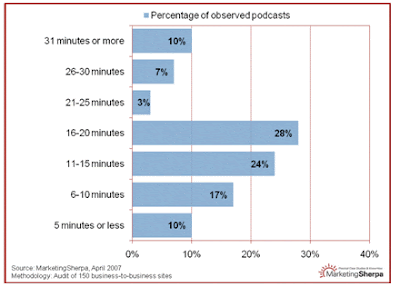
The length of podcasts sampled from 150 business-to-business sites vary from short (5 minutes or less) to long (31 minutes or more). MarketingSherpa draws four conclusions:
“#1: Content Determines Length
Content should dictate everything else – including length. The ‘best practice’ seems to be short podcasts – 10 minutes or less, but we found that most podcasts are longer with some very successful outliers. It might be helpful to follow the format of radio news broadcasts. You can get your message across in a few minutes; an ‘in-depth’ story is usually 5 to 7 minutes long.
#2: Focus on Single Topic
One reason many good podcasts are short is that they focus on a single, discrete topic. It’s not the only way to approach production, but it’s probably a good idea especially when starting out. Potential listeners eyeing podcast titles generally will give a new provider a whirl if the topic of the podcast is very specific.
#3: Stress Content, Not Production
Perfect sound and music and good product values will not make or break your podcast –the quality of the content will do that. Low-fidelity user-generated content has inured us to poor sound quality, and inexpensive software can smooth out the sound and get rid of all those distracting “ums.”
#4: Webinars: a Good Model
Look at your existing catalog of recorded webinars when you want to get started – you can often break them down into podcasts, almost slide by slide. Think of a webinar as a string of discrete podcasts in the making.”
Sounds very much like advice for a Great Demo!
Sounds very much like advice for a Great Demo!
Wednesday, June 25, 2008
Shameless Self-Promotion...!
Who's in the Audience - with Respect to Age
Be cognizant of who you are demonstrating to, with respect to age groups and corresponding culture and language norms: Traditionalists vs. Baby Boomers vs. Gen X vs. Millennials.
Your specific language and style may appeal more (or less) to specific groups, preferentially. Similarly, use of specific technology and tools may also impact your results, in accord with which groups are in your audience.
While this may be a challenge in face-to-face demos, it can be even more difficult with Remote Demos. After all, you can’t typically ask everyone to state their age over the phone…! You can, however, listen carefully for verbal clues as to your audience’s age groupings.
Your specific language and style may appeal more (or less) to specific groups, preferentially. Similarly, use of specific technology and tools may also impact your results, in accord with which groups are in your audience.
While this may be a challenge in face-to-face demos, it can be even more difficult with Remote Demos. After all, you can’t typically ask everyone to state their age over the phone…! You can, however, listen carefully for verbal clues as to your audience’s age groupings.
Subscribe to:
Posts (Atom)