For those who missed our recent webinar and are suffering serious withdrawal as a result, rescue is at hand... Here's where you can find the recording: http://www.glance.net/custom/Webinars/PeterCohan_20080711/Webinar.html.
Many thanks to Glance Networks, who hosted the event.
Sunday, July 20, 2008


Monday, July 7, 2008
Terrific Discovery/Qualification Question
Here is a truly terrific question to ask in a Discovery or Qualification session: “Is there anything I should be asking that I haven’t yet asked?”
This is best done at the end of a Discovery discussion or Qualification session. It has the wonderful effect of causing your customer to pause and think, critically. Often your customer will come up with something that is important, which you both missed previously in your discussion.
Try it!
This is best done at the end of a Discovery discussion or Qualification session. It has the wonderful effect of causing your customer to pause and think, critically. Often your customer will come up with something that is important, which you both missed previously in your discussion.
Try it!
Tuesday, July 1, 2008
Podcast Length – Reflective of Demos, Similarly?
A recent study of podcast length by MarketingSherpa (http://www.marketingsherpa.com/) provides some interesting insights for demos.
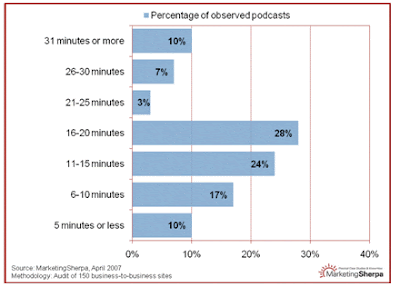
The length of podcasts sampled from 150 business-to-business sites vary from short (5 minutes or less) to long (31 minutes or more). MarketingSherpa draws four conclusions:
“#1: Content Determines Length
Content should dictate everything else – including length. The ‘best practice’ seems to be short podcasts – 10 minutes or less, but we found that most podcasts are longer with some very successful outliers. It might be helpful to follow the format of radio news broadcasts. You can get your message across in a few minutes; an ‘in-depth’ story is usually 5 to 7 minutes long.
#2: Focus on Single Topic
One reason many good podcasts are short is that they focus on a single, discrete topic. It’s not the only way to approach production, but it’s probably a good idea especially when starting out. Potential listeners eyeing podcast titles generally will give a new provider a whirl if the topic of the podcast is very specific.
#3: Stress Content, Not Production
Perfect sound and music and good product values will not make or break your podcast –the quality of the content will do that. Low-fidelity user-generated content has inured us to poor sound quality, and inexpensive software can smooth out the sound and get rid of all those distracting “ums.”
#4: Webinars: a Good Model
Look at your existing catalog of recorded webinars when you want to get started – you can often break them down into podcasts, almost slide by slide. Think of a webinar as a string of discrete podcasts in the making.”
Sounds very much like advice for a Great Demo!
Sounds very much like advice for a Great Demo!
Wednesday, June 25, 2008
Shameless Self-Promotion...!
Who's in the Audience - with Respect to Age
Be cognizant of who you are demonstrating to, with respect to age groups and corresponding culture and language norms: Traditionalists vs. Baby Boomers vs. Gen X vs. Millennials.
Your specific language and style may appeal more (or less) to specific groups, preferentially. Similarly, use of specific technology and tools may also impact your results, in accord with which groups are in your audience.
While this may be a challenge in face-to-face demos, it can be even more difficult with Remote Demos. After all, you can’t typically ask everyone to state their age over the phone…! You can, however, listen carefully for verbal clues as to your audience’s age groupings.
Your specific language and style may appeal more (or less) to specific groups, preferentially. Similarly, use of specific technology and tools may also impact your results, in accord with which groups are in your audience.
While this may be a challenge in face-to-face demos, it can be even more difficult with Remote Demos. After all, you can’t typically ask everyone to state their age over the phone…! You can, however, listen carefully for verbal clues as to your audience’s age groupings.
Tuesday, June 24, 2008
Easy vs. Hard Concepts...
Generally speaking, "easy" ideas are implemented first; harder ideas take longer and may require additional support, motivation, explanation, or repetitions.
Interestingly, the harder ideas may often be of higher value to implement. What has been your experience with this conundrum?
Interestingly, the harder ideas may often be of higher value to implement. What has been your experience with this conundrum?
Monday, June 23, 2008
Facts Tell, Stories Sell...
I came across this great quote recently – germane to delivering compelling demos: "Facts tell, stories sell...".
A stream of facts is boring and generally uninteresting - but capabilities that are embedded as components of a logical (and interesting!) story have much more relevance and interest.
A stream of facts is boring and generally uninteresting - but capabilities that are embedded as components of a logical (and interesting!) story have much more relevance and interest.
Tuesday, June 3, 2008
February 2008 Great Demo! Book Purchases
Dear Readers,
If you purchased a copy of Great Demo! in February this year via Amazon.com, can you please contact me (PCohan@SecondDerivative.com or +1 650 631 3694)? I'm looking for some help to address a problem with my publisher. I'd be very grateful for your help with this!
Best Regards,
Peter
If you purchased a copy of Great Demo! in February this year via Amazon.com, can you please contact me (PCohan@SecondDerivative.com or +1 650 631 3694)? I'm looking for some help to address a problem with my publisher. I'd be very grateful for your help with this!
Best Regards,
Peter
Competitive Demo Situations – Biasing Towards Your Strengths
The end of the quarter is only a few weeks away – and you are in competition for business you really need to make your numbers. The customer has organized a final round of demos from the vendors who have made it this far – a “bake-off” – and you are preparing for the event. As far as the customer is concerned, all remaining vendors are perceived as equivalent with respect to their offerings.
What can you do to differentiate from your competition and increase your chances for success?
Too Much… Is a Recipe for Disaster
Clearly, you want to alert your customer to your particular strengths. But how do you accomplish this without flogging your customer with capabilities they don’t want, services they aren’t interested in, and information that is not relevant for their situation? Introducing these will only hurt your cause:
- Customer Management: “I’m not interested in all of those features – and I don’t want to have to pay for them…”
- Customer End-user: “Ouch – all those different tools and functions make their software look really hard to use. It is far too complicated, for me…”
- Customer IT: “Oh-oh – they list a pile of training and support services, so their software much be really hard to implement and keep running. I’ll bet I’m going to end up with a huge support problem on my hands…!”
Not a good situation…! So how do you introduce capabilities that can help your cause?
Whole Product Analysis
The first step is to understand your strengths in relation to your customer’s specific situation. A terrific tool to accomplish this is called Whole Product Analysis – a method of outlining all possible areas of strength (and weakness). This goes far beyond lists of features and functions, embracing other areas of potential importance for your customer.
Is implementation a concern? What about referencable existing customers? How about a Users’ Group in their geography? Response times and resolution effectiveness from your Customer Support Team? Product Roadmap and plans for future releases? Professional Services resources and experience with custom implementations? Many of these may be important, even critical, to your customer, and could tip the business in your favor.
How can you assemble this list? One effective mechanism is to gather a small team into a conference room and invest an hour brainstorming your potential strengths (this is a great task for marketing – product managers, in particular). List everything that might be relevant – go far beyond what’s in the code…:
- Company years in business
- Company size
- Number of customers
- Number of users
- Geographic location of offices
- Reference customers
- Users’ Groups
- Advisory Forums
- Product maturity (releases)
- Product key capabilities
- Additional modules
- Complementary products
- Product roadmaps
- 3rd party complementary offerings
- Partners and resellers
- Customer Support team
- Professional Services
o Training
o Consulting
o Implementation experience
- Implementation roadmaps and timelines
- Implementation tips and guidelines
o Example “Early Wins”
- Typical time to production use
- Typical “footprint and growth” information
- Formal Success Stories and Case Studies
- Informal Success Stories
- Staff experience and longevity:
o Sales
o Presales
o Marketing
o Professional Services
o Customer Support
o Development
o Management
- Corporate “Green” position and implementation status
- Etc. Etc. Etc.
Your objective is to be as broad as possible in this exercise to create a list that can be used for multiple customer situations.
Next, select those items that are relevant and potentially important for the specific customer at hand. Now you are almost ready…
The Biased Question
You now have a list of product capabilities and broader items that may be interesting, important, or even vitally critical for your customer. How do you test – how do you introduce these without incurring the risk of presenting too much?
The use of the Biased Question is a delightful and highly effective method. Here’s an example:
Let’s assume that you can provide a SaaS (Software as a Service) version of your offering, in addition to your standard offering, and your competition can only provide a “behind the firewall” installation. Up until this point there had only been discussion of the traditional “behind the firewall” version. During your demo, you introduce the SaaS possibility using a Biased Question.
You say,
“Many of our other customers, in very similar situations to yours, have found significant advantages in using a SaaS version of our software. They were able to reduce the consumption of their internal IT support resources significantly, enable an earlier implementation and initial roll-out, gain significant “early wins” and enjoy a faster return on their investment.
In addition to our ‘behind your firewall’ offering, we also offer a SaaS version. Is this something that might also be useful for you?”
There are two possible answers – “yes” or “no”. If your customer says, “Yes”, then you respond,
“We have that capability – would you like to see it…?”
This is terrific! You’ve now established a key competitive advantage over your competition and confirmed that this is interesting or important for your customer. You’ve effectively added a “row” to the customer’s evaluation table that is biased in your favor.
A key to the success of this method is the use of an Informal Success Story to help introduce the capability. In the example above, one or more Informal Success Stories were used to provide the customer with examples of the rewards other customers enjoyed as a result of consuming the capability in question. This is the strong bias that makes the introduction of the capability so compelling.
What If They Say No?
If the customer says, “No…” then you simply drop it and move on. No need to show the capability or discuss it further.
The key here is that you are introducing a capability in the form of a question first – as opposed to blindly demonstrating it or discussing it on a PowerPoint slide. Your Biased Question enables a customer to respond, “No, I’m not interested in that…” without you incurring the risk of demonstrating or presenting too many features or non-relevant corporate capabilities.
If your customer says “No” then don’t show it or talk about it further! It is clearly not important to them.
It’s as Simple as ABC
The moral here is to Ask Before (presenting the) Capability – simple ABC. [OK, I know that acronym is a stretch, but go with me on this…!]
The use of the Biased Question is a wonderfully effective way to introduce capabilities that you hope or believe may be competitively advantageous for you. Give it a try and look forward to securing a few more orders this year!
What can you do to differentiate from your competition and increase your chances for success?
Too Much… Is a Recipe for Disaster
Clearly, you want to alert your customer to your particular strengths. But how do you accomplish this without flogging your customer with capabilities they don’t want, services they aren’t interested in, and information that is not relevant for their situation? Introducing these will only hurt your cause:
- Customer Management: “I’m not interested in all of those features – and I don’t want to have to pay for them…”
- Customer End-user: “Ouch – all those different tools and functions make their software look really hard to use. It is far too complicated, for me…”
- Customer IT: “Oh-oh – they list a pile of training and support services, so their software much be really hard to implement and keep running. I’ll bet I’m going to end up with a huge support problem on my hands…!”
Not a good situation…! So how do you introduce capabilities that can help your cause?
Whole Product Analysis
The first step is to understand your strengths in relation to your customer’s specific situation. A terrific tool to accomplish this is called Whole Product Analysis – a method of outlining all possible areas of strength (and weakness). This goes far beyond lists of features and functions, embracing other areas of potential importance for your customer.
Is implementation a concern? What about referencable existing customers? How about a Users’ Group in their geography? Response times and resolution effectiveness from your Customer Support Team? Product Roadmap and plans for future releases? Professional Services resources and experience with custom implementations? Many of these may be important, even critical, to your customer, and could tip the business in your favor.
How can you assemble this list? One effective mechanism is to gather a small team into a conference room and invest an hour brainstorming your potential strengths (this is a great task for marketing – product managers, in particular). List everything that might be relevant – go far beyond what’s in the code…:
- Company years in business
- Company size
- Number of customers
- Number of users
- Geographic location of offices
- Reference customers
- Users’ Groups
- Advisory Forums
- Product maturity (releases)
- Product key capabilities
- Additional modules
- Complementary products
- Product roadmaps
- 3rd party complementary offerings
- Partners and resellers
- Customer Support team
- Professional Services
o Training
o Consulting
o Implementation experience
- Implementation roadmaps and timelines
- Implementation tips and guidelines
o Example “Early Wins”
- Typical time to production use
- Typical “footprint and growth” information
- Formal Success Stories and Case Studies
- Informal Success Stories
- Staff experience and longevity:
o Sales
o Presales
o Marketing
o Professional Services
o Customer Support
o Development
o Management
- Corporate “Green” position and implementation status
- Etc. Etc. Etc.
Your objective is to be as broad as possible in this exercise to create a list that can be used for multiple customer situations.
Next, select those items that are relevant and potentially important for the specific customer at hand. Now you are almost ready…
The Biased Question
You now have a list of product capabilities and broader items that may be interesting, important, or even vitally critical for your customer. How do you test – how do you introduce these without incurring the risk of presenting too much?
The use of the Biased Question is a delightful and highly effective method. Here’s an example:
Let’s assume that you can provide a SaaS (Software as a Service) version of your offering, in addition to your standard offering, and your competition can only provide a “behind the firewall” installation. Up until this point there had only been discussion of the traditional “behind the firewall” version. During your demo, you introduce the SaaS possibility using a Biased Question.
You say,
“Many of our other customers, in very similar situations to yours, have found significant advantages in using a SaaS version of our software. They were able to reduce the consumption of their internal IT support resources significantly, enable an earlier implementation and initial roll-out, gain significant “early wins” and enjoy a faster return on their investment.
In addition to our ‘behind your firewall’ offering, we also offer a SaaS version. Is this something that might also be useful for you?”
There are two possible answers – “yes” or “no”. If your customer says, “Yes”, then you respond,
“We have that capability – would you like to see it…?”
This is terrific! You’ve now established a key competitive advantage over your competition and confirmed that this is interesting or important for your customer. You’ve effectively added a “row” to the customer’s evaluation table that is biased in your favor.
A key to the success of this method is the use of an Informal Success Story to help introduce the capability. In the example above, one or more Informal Success Stories were used to provide the customer with examples of the rewards other customers enjoyed as a result of consuming the capability in question. This is the strong bias that makes the introduction of the capability so compelling.
What If They Say No?
If the customer says, “No…” then you simply drop it and move on. No need to show the capability or discuss it further.
The key here is that you are introducing a capability in the form of a question first – as opposed to blindly demonstrating it or discussing it on a PowerPoint slide. Your Biased Question enables a customer to respond, “No, I’m not interested in that…” without you incurring the risk of demonstrating or presenting too many features or non-relevant corporate capabilities.
If your customer says “No” then don’t show it or talk about it further! It is clearly not important to them.
It’s as Simple as ABC
The moral here is to Ask Before (presenting the) Capability – simple ABC. [OK, I know that acronym is a stretch, but go with me on this…!]
The use of the Biased Question is a wonderfully effective way to introduce capabilities that you hope or believe may be competitively advantageous for you. Give it a try and look forward to securing a few more orders this year!
Monday, June 2, 2008
Tell 'em, tell 'em, told 'em Variant for Remote Demos
Ken Molay, a web presentation expert, offers a wonderful variant of the “Tell them what you are going to tell them, tell them, then tell them what you told them…” mantra, for Remote Demos.
Specifically, for Remote Demos, when you present a key capability in your demo, follow these three steps:
- First, tell the audience what is going to happen and draw their attention to where the mouse is right now…
- Then, tell the audience what change they should look for…
- Finally, tell the audience what change just occurred.
Here’s an example:
“So, next I’m going to finalize the change to the form on the screen. What you’ll see is the new column appearing next to “revenues” – and right now my mouse is sitting over the “Submit” button.
As I click on “Submit” you should see the screen refresh and the new column appear on the right.
There…! And now I’m highlighting the first few rows of the new column with my mouse…”
This is a wonderful piece of advice and works very well. More on Ken and his thoughts can be found at http://www.wsuccess.com/.
Specifically, for Remote Demos, when you present a key capability in your demo, follow these three steps:
- First, tell the audience what is going to happen and draw their attention to where the mouse is right now…
- Then, tell the audience what change they should look for…
- Finally, tell the audience what change just occurred.
Here’s an example:
“So, next I’m going to finalize the change to the form on the screen. What you’ll see is the new column appearing next to “revenues” – and right now my mouse is sitting over the “Submit” button.
As I click on “Submit” you should see the screen refresh and the new column appear on the right.
There…! And now I’m highlighting the first few rows of the new column with my mouse…”
This is a wonderful piece of advice and works very well. More on Ken and his thoughts can be found at http://www.wsuccess.com/.
Thursday, May 29, 2008
Move and Stop, Move and Stop
Ken Molay, a web presentation expert, suggests the idea of “move and stop, move and stop” when delivering demos over the web. Specifically, he recommends using your mouse to deliberately move to a location and then stop and leave the mouse still while you offer a brief verbal description; then move and stop again.
This practice gives the audience sufficient time to follow the mouse movements, particularly if there is a delay or latency in the web session. It also provides the audience with a brief respite from an otherwise constantly moving mouse!
While Ken makes this suggestion with regards to Remote Demos, the same principle can certainly be applied to face-to-face sessions.
More on Ken and his thoughts can be found at http://www.wsuccess.com/.
This practice gives the audience sufficient time to follow the mouse movements, particularly if there is a delay or latency in the web session. It also provides the audience with a brief respite from an otherwise constantly moving mouse!
While Ken makes this suggestion with regards to Remote Demos, the same principle can certainly be applied to face-to-face sessions.
More on Ken and his thoughts can be found at http://www.wsuccess.com/.
Tuesday, May 27, 2008
Long Email Streams – Refresh Contact Info
When you are responding to customer email that is the result of a series of messages sent back and forth, you may want to occasionally refresh your contact information by including it in your most recent response.
This will help your customer find your phone number or other contact information more easily, should they wish to use it. Otherwise they may have to scroll all the way down to the beginning of the email stream to find your contact info.
This may be even more important for Blackberry (and similar device) users. In many cases, Blackberry users cannot scroll to the beginning of an email stream since the Blackberry is limited on the length of the message it supports – much of the original traffic may have been truncated.
This will help your customer find your phone number or other contact information more easily, should they wish to use it. Otherwise they may have to scroll all the way down to the beginning of the email stream to find your contact info.
This may be even more important for Blackberry (and similar device) users. In many cases, Blackberry users cannot scroll to the beginning of an email stream since the Blackberry is limited on the length of the message it supports – much of the original traffic may have been truncated.
Thursday, May 22, 2008
The Real Competition
According to statistics I heard cited in a recent webinar, executives today face the following daily “pile”:
- 59 hours of work to be done (that day, conceptually) is sitting on their desks
- Their day is largely booked with meetings
- They receive ~150 email messages
- They receive ~29 voicemail messages
Now tell me again why they should listen to your 20 minute corporate overview presentation or wait through 40 minutes of demo to hear the punch line?
- 59 hours of work to be done (that day, conceptually) is sitting on their desks
- Their day is largely booked with meetings
- They receive ~150 email messages
- They receive ~29 voicemail messages
Now tell me again why they should listen to your 20 minute corporate overview presentation or wait through 40 minutes of demo to hear the punch line?
Monday, May 19, 2008
Probe Probes
Very often, when a customer asks a question in a demo, you have an opportunity at hand to expand vision, achieve competitive differentiation, or reinforce value. Too often, we don’t take advantage of these opportunities…!
Frequently, we answer questions directly, rather than probe for further understanding before providing an answer. Jumping too rapidly to an answer is where we lose our opportunity.
For an example, let’s say that you provide a SaaS (software as a service) offering that runs equally well on Macintosh and Windows versions of Internet Explorer (but your competition only supports Windows)…
Case One – the Lost Opportunity:
During your demo, a customer asks, “Do you support Macintosh?”
You answer, “Yes, we do” and then continue with your demo. You’ve clearly squandered the opportunity to support this further. [They could simply be curious; they could be interested in a handful of machines or a pile of Macs; you just don’t know…]
Case Two – Opportunity Seized:
During your demo, a customer asks, “Do you support Macintosh?”
You answer, “Yes, we do” and then follow with, “Why do you ask?”
The customer replies, “Well, we are about 50% Macs these days and Mac support is critical. Some other vendors either don’t support Mac at all or do it poorly”.
You comment, “Thanks – the Macintosh is a key platform for us and our current customers, and our product roadmap for future releases continues to emphasize this.” [Ah ha! Mac is a very important issue for them and you have a huge competitive advantage…!]
The moral? Contemplate “probing probes” when you believe you may have appropriate opportunities.
Frequently, we answer questions directly, rather than probe for further understanding before providing an answer. Jumping too rapidly to an answer is where we lose our opportunity.
For an example, let’s say that you provide a SaaS (software as a service) offering that runs equally well on Macintosh and Windows versions of Internet Explorer (but your competition only supports Windows)…
Case One – the Lost Opportunity:
During your demo, a customer asks, “Do you support Macintosh?”
You answer, “Yes, we do” and then continue with your demo. You’ve clearly squandered the opportunity to support this further. [They could simply be curious; they could be interested in a handful of machines or a pile of Macs; you just don’t know…]
Case Two – Opportunity Seized:
During your demo, a customer asks, “Do you support Macintosh?”
You answer, “Yes, we do” and then follow with, “Why do you ask?”
The customer replies, “Well, we are about 50% Macs these days and Mac support is critical. Some other vendors either don’t support Mac at all or do it poorly”.
You comment, “Thanks – the Macintosh is a key platform for us and our current customers, and our product roadmap for future releases continues to emphasize this.” [Ah ha! Mac is a very important issue for them and you have a huge competitive advantage…!]
The moral? Contemplate “probing probes” when you believe you may have appropriate opportunities.
Tuesday, May 13, 2008
Integrating Sales into Demos
Here’s a question regarding integrating sales people into a demo:
“I was wondering if you could point me specifically to any thoughts you have about Sales and Presales working in tandem in a sales call. Over the years I have personally experienced some Sales reps briefly introducing themselves, then introducing me - and then saying ‘now watch Bob for the rest of the hour’. They sit back and expect me to run the sales call with my demo.
I'm wondering if you have any best practices we can reference to improve this interaction?”
This is a terrific and very important topic..! Yes, there are a number of practices and methods to apply that integrate the sales people into the demo. Here are a few:
Use a “Situation Slide” to introduce the customer’s situation at the start of the demo – I recommend that the sales person does this part.
- Follow with an “Illustration” of the end result or results – sales or presales can do this. Sales should then “hand-off” to the Presales person, but remain engaged…
- Sales people should occasionally do a summary of the demo, or demo segment, to both help the audience remember what they are seeing and to break up what may otherwise be a gush of features…!
- Sales should help “queue” questions (via a “Not Now” List or “Parking Lot”) to help manage the flow of the demo and to avoid going off into technical details too early (or when high-ranking customer representatives are present).
- Sales should be prepared to step in if an AE encounters a serious bug or crashes – to call a break, cover the projector, and redirect attention to the list of questions (for example).
- Both parties can “rescue” the other (e.g., going too deep answering a question, remembering to summarize a key point or segment, etc.).
- Both the Sales person and Presales person should be in the front of the room during the demo, as well, to support the above processes and practices.
- Doing demos remotely (e.g., via WebEx or GoToMeeting) offers a broad set of opportunities for team play. Having the sales person present at the customer enables higher success rates, as the role of the sales person is to be an active set of eyes and ears for the technical colleague located remotely.
In our Great Demo! Workshops we suggest that a demo should be perceived by the customer as a conversation, rather than a one-way presentation. The role of sales is to help facilitate this conversation – and to be an active listener.
Other suggestions?
Friday, May 9, 2008
Change “Test” or “Demo” to “Production”
We've commented previously that using the words "test" or "demo" for file names, examples accounts and other similar uses in demos it not recommended - it tells the customer that the application they are seeing is not "real".
One simple solution is to change every use of "demo" or "test" to "production". This generates the impression that it truly is a real environment...!
One simple solution is to change every use of "demo" or "test" to "production". This generates the impression that it truly is a real environment...!
Tuesday, May 6, 2008
Great / Awful Demo...
Here's a very interesting recorded demo to check out:
http://www.disruptormonkey.com/foundry/
Comments?
Here’s what I liked:
- REALLY liked the “before” situation – very compellingly presented.
- The groovy music, rather than a “professional” voice-over with background thrumming…
- The recording/playback technology looks like a nice tool.
Here’s what I thought they could do better:
- What the heck is the deliverable??? What business process is this improving (web searching and information collection, I assume)?
- Make it easy to take action. The company name and URL or phone should have been displayed long and last, with opportunity to click.
http://www.disruptormonkey.com/foundry/
Comments?
Here’s what I liked:
- REALLY liked the “before” situation – very compellingly presented.
- The groovy music, rather than a “professional” voice-over with background thrumming…
- The recording/playback technology looks like a nice tool.
Here’s what I thought they could do better:
- What the heck is the deliverable??? What business process is this improving (web searching and information collection, I assume)?
- Make it easy to take action. The company name and URL or phone should have been displayed long and last, with opportunity to click.
Vendors for Recorded Demos
What vendors have you worked with that build recorded demos for online or website use? What have your experiences been?
Here are the URL’s for three companies offering services in this area. Are there others to consider?
http://www.flickerbox.com/
http://www.vtdemos.com/
www.Autodemo.com
Here are the URL’s for three companies offering services in this area. Are there others to consider?
http://www.flickerbox.com/
http://www.vtdemos.com/
www.Autodemo.com
Monday, May 5, 2008
How Many Visits per $100K?
During a call with a prospect today, the idea surfaced that there appears to be a relationship between the number of customer visits (or virtual meetings) required to secure each $100K of an order.
For example, an order of $100K might typically require 2-3 visits, plus an additional customer visit for each additional $100K in the deal. A $1M order would thus consume 10-12 visits.
Comments?
For example, an order of $100K might typically require 2-3 visits, plus an additional customer visit for each additional $100K in the deal. A $1M order would thus consume 10-12 visits.
Comments?
Thursday, May 1, 2008
The W Key in Remote Demos
In PowerPoint Slideshow mode, the “B” key can be used to toggle between your presentation and a black screen. This can be very effective in face-to-face presentations when you want to direct the audience’s attention away from the screen. You can achieve a similar effect in Remote Demos (using WebEx, GoToMeeting, etc.) by using the “W” key.
In PowerPoint’s Slideshow mode, pressing “W” turns your screen white. If you want to draw your audience’s attention away from the computer screen in a Remote Demo, use the W key and say, “I’ve just blanked the screen…” The white lets the audience know that the web conferencing session is still active.
It is a nice tool and technique – try it!
In PowerPoint’s Slideshow mode, pressing “W” turns your screen white. If you want to draw your audience’s attention away from the computer screen in a Remote Demo, use the W key and say, “I’ve just blanked the screen…” The white lets the audience know that the web conferencing session is still active.
It is a nice tool and technique – try it!
Tuesday, April 29, 2008
Friday Fun: How (not) to use PowerPoint
This video is WAY too fun (and funny and pointed...)!
http://lawprofessors.typepad.com/law_librarian_blog/2007/04/friday_fun_how_.html
http://lawprofessors.typepad.com/law_librarian_blog/2007/04/friday_fun_how_.html
Tuesday, April 8, 2008
Dead-ends…
Avoid dead-ends. Let me say that again: avoid dead-ends. I recently watched a demo where the presenter explored what seemed to be all possible potential pathways to complete a single task. What could have been completed in about 30 seconds – about 5 mouse clicks – took 24 minutes!
The presenter pursued two sets of non-productive pathways:
- Alternative approaches (“…and another way to do this is to…”)
- Dead-ends (“…but for this example we won’t do that and instead we’ll go back to where we were a moment ago…”)
The end result was a Stunningly Awful Demo, perceived as too complicated, too convoluted, and too complex by the audience.
When you have the option to present a range of pathways or related capabilities, choose the highest probability pathway for the customer at hand and execute that pathway with the fewest number of steps to complete the task.
To be fair, there may be situations where some of these alternative approaches or dead-ends may be useful or even important. An excellent way to test for interest in exploring any alternative approaches or capabilities represented by dead-ends is to ask.
For example, “Are you interested in seeing how you can do this task using the menus instead of the wizard we just used?”
Or, “We have a number of other output options – are there any output formats that you would like to see in particular?”
Otherwise, avoid alternative approaches and dead-ends…!
The presenter pursued two sets of non-productive pathways:
- Alternative approaches (“…and another way to do this is to…”)
- Dead-ends (“…but for this example we won’t do that and instead we’ll go back to where we were a moment ago…”)
The end result was a Stunningly Awful Demo, perceived as too complicated, too convoluted, and too complex by the audience.
When you have the option to present a range of pathways or related capabilities, choose the highest probability pathway for the customer at hand and execute that pathway with the fewest number of steps to complete the task.
To be fair, there may be situations where some of these alternative approaches or dead-ends may be useful or even important. An excellent way to test for interest in exploring any alternative approaches or capabilities represented by dead-ends is to ask.
For example, “Are you interested in seeing how you can do this task using the menus instead of the wizard we just used?”
Or, “We have a number of other output options – are there any output formats that you would like to see in particular?”
Otherwise, avoid alternative approaches and dead-ends…!
Monday, April 7, 2008
A Solution to "Death by PowerPoint" - In Nine Minutes
Gavin Meikle has put together a very nice, compact (nine minute) video that provides a simple set of solutions to the typical misuses of PowerPoint. He effectively summarizes the key messages in Cliff Atkinson’s book Beyond Bullet Points in a compact, easily consumable format.
Here’s the link to his video/presentation: http://www.trainingdesign.be/2008/01/20/its-powerpoint-jim-but-not-as-we-know-it/
Here’s the link to his video/presentation: http://www.trainingdesign.be/2008/01/20/its-powerpoint-jim-but-not-as-we-know-it/
Friday, April 4, 2008
Yet More Auto-Demo Hell - A "Customized" Recorded Demo?
Should a recorded or canned demo by “customized”? Interesting and tough challenge…!
By definition, recorded demos are not customized for any specific customer. However, an attempt to create a single recorded demo that embraces the needs and situations of a range of prospects with different job titles in differing markets is likely doomed to fail.
Example: Consider CRM demos that try to cover the needs of salespeople, sales management, and marketing. Sales management is most interested, typically, in forecast accuracy and transparency – which relies upon data entry by salespeople. A demo that shows a rep entering a pile of pipeline information (deal size, key players, likely close date, probability, deal stage, etc.etc.) will likely please the VP of sales but annoy the sales reps.
Similarly, the above scenario does little to help a marketing manager charged with executing lead generation campaigns – her demo needs to speak to the results and processes of campaign execution and management.
In summary, recorded demos need to be “customized” at least to address relevant market- and job-title specific situations. Recorded demos that show no apparent effort to customize are likely to:
1. Be perceived as insulting by the customer (“we are not all alike”)
2. Will result in more work for the vendor to get the same business (“I didn’t see what I needed in your demo – and it appeared to be inflexible”)
3. Violates nearly every customer-centric principle (and certainly the core principles of the Great Demo! method)
When I’m working with customers to help with their recorded demos (e.g., hosted on their websites), I recommend a Menu Approach to lead each individual prospect to the specific, generically-customized demo that matches that customer’s industry and job-title. That means, potentially, multiple recorded demos as opposed to a single demo that hopes to somehow embrace everyone.
Does this mean that you need to generate recorded demos for every target job title and market? Yes and no…
Yes; in that the prospect should perceive that they have been led to a demo that is specifically relevant for them. No; you should expect that the situations for many job titles will be reasonably homogeneous across markets – providing the ability to leverage one recorded demo across those markets. (You’ll need to be careful/clever about what data is used). Often, you can apply different voice-overs to one core demo to lend the appearance of a recorded demo that has been customized for a specific target audience.
The perception that a recorded demo has been created specifically for an audience can truly accelerate the sales cycle!
By definition, recorded demos are not customized for any specific customer. However, an attempt to create a single recorded demo that embraces the needs and situations of a range of prospects with different job titles in differing markets is likely doomed to fail.
Example: Consider CRM demos that try to cover the needs of salespeople, sales management, and marketing. Sales management is most interested, typically, in forecast accuracy and transparency – which relies upon data entry by salespeople. A demo that shows a rep entering a pile of pipeline information (deal size, key players, likely close date, probability, deal stage, etc.etc.) will likely please the VP of sales but annoy the sales reps.
Similarly, the above scenario does little to help a marketing manager charged with executing lead generation campaigns – her demo needs to speak to the results and processes of campaign execution and management.
In summary, recorded demos need to be “customized” at least to address relevant market- and job-title specific situations. Recorded demos that show no apparent effort to customize are likely to:
1. Be perceived as insulting by the customer (“we are not all alike”)
2. Will result in more work for the vendor to get the same business (“I didn’t see what I needed in your demo – and it appeared to be inflexible”)
3. Violates nearly every customer-centric principle (and certainly the core principles of the Great Demo! method)
When I’m working with customers to help with their recorded demos (e.g., hosted on their websites), I recommend a Menu Approach to lead each individual prospect to the specific, generically-customized demo that matches that customer’s industry and job-title. That means, potentially, multiple recorded demos as opposed to a single demo that hopes to somehow embrace everyone.
Does this mean that you need to generate recorded demos for every target job title and market? Yes and no…
Yes; in that the prospect should perceive that they have been led to a demo that is specifically relevant for them. No; you should expect that the situations for many job titles will be reasonably homogeneous across markets – providing the ability to leverage one recorded demo across those markets. (You’ll need to be careful/clever about what data is used). Often, you can apply different voice-overs to one core demo to lend the appearance of a recorded demo that has been customized for a specific target audience.
The perception that a recorded demo has been created specifically for an audience can truly accelerate the sales cycle!
Thursday, April 3, 2008
More on Auto-Demo Hell…
A recent Great Demo! Workshop participant (from his marketing department) shared a challenge he was facing: His boss asked him to prepare a recorded demo that could be hosted on their website right away to support the launch of a new version of their product.
When he (wisely) asked some of his sales counterparts for input on the draft demo, he was told:
- Looks great!
- Looks awful!
- Perfect for my customers!
- Totally wrong for my customers!
What was happening?
After discussion, it became clear that the sales team is organized into two major groups: “Hunters”, who work to secure new business and “Farmers”, who’s role is to develop existing customers. The Farmers loved the demo and the Hunters despised it. Why? Because the demo focused on the new capabilities recently released.
Current customers are, generally speaking, attuned to the typical use cases for the software. They generally “get it” with respect to the possible uses for new features and capabilities that are provided in a new release. A demo that focuses on these new features may be adequate for current customers. (Note that using Situation Slides that summarize the intended use cases will be more successful than a demo that simply highlights capabilities).
On the other hand, new prospects may have no context and will likely be confused when presented with a feature-based demo. A demo that focuses on a set of new features will be even more confusing – it assumes a base understanding of the software already released.
Consider your sales organization and the nature of your customers when preparing recorded (or core) demos. A demo prepared for a users’ group meeting may be terrific for existing customers but will fail horribly when presented to new prospects!
When he (wisely) asked some of his sales counterparts for input on the draft demo, he was told:
- Looks great!
- Looks awful!
- Perfect for my customers!
- Totally wrong for my customers!
What was happening?
After discussion, it became clear that the sales team is organized into two major groups: “Hunters”, who work to secure new business and “Farmers”, who’s role is to develop existing customers. The Farmers loved the demo and the Hunters despised it. Why? Because the demo focused on the new capabilities recently released.
Current customers are, generally speaking, attuned to the typical use cases for the software. They generally “get it” with respect to the possible uses for new features and capabilities that are provided in a new release. A demo that focuses on these new features may be adequate for current customers. (Note that using Situation Slides that summarize the intended use cases will be more successful than a demo that simply highlights capabilities).
On the other hand, new prospects may have no context and will likely be confused when presented with a feature-based demo. A demo that focuses on a set of new features will be even more confusing – it assumes a base understanding of the software already released.
Consider your sales organization and the nature of your customers when preparing recorded (or core) demos. A demo prepared for a users’ group meeting may be terrific for existing customers but will fail horribly when presented to new prospects!
Subscribe to:
Posts (Atom)